How subscription sets work
Three things make a subscription set, and each has one home:
- The plan lives in your subscription app, such as Shopify Subscriptions, and goes on the products inside the set: each coffee in a coffee set. It never goes on the set product. The set product has no purchase options, and that is correct.
- Luxe offers the plan in the Bundle set builder and in a Collection set's tray, as a purchase option beside One-time purchase.
- When a shopper subscribes, Luxe adds each picked item to the cart as its own line on that plan, grouped as one set. At checkout your subscription app creates one subscription for those items.
What subscribers pay:
- First delivery. Each item at the plan's price, less the set's own saving. A set at 10% off with a "Subscribe and save 10%" plan takes 10% off each item, then 10% again.
- Later deliveries. Charged by your subscription app at the plan's price. The set's saving applies to the first delivery only.
The builder, the tray, the Luxe cart and checkout show the same first-delivery price to the cent. Luxe never creates, edits or cancels plans or subscriptions: they stay in your subscription app. For how it works under the hood, see the developer docs: Subscription sets.
Before you start
- A subscription app. Install Shopify Subscriptions (free) from the Shopify App Store. It is verified with Luxe on live orders. Recharge, Skio, Loop, Appstle and other subscription apps work in principle, since Luxe adds ordinary cart lines with your plan, but they are not verified yet. See Compatibility.
- A bundle set whose pricing can subscribe. Most can: see which bundle sets can be sold on subscription. The editor says so on every set.
- A plan that charges each delivery. Luxe offers plans that charge each delivery as it ships. Prepaid plans (several deliveries paid at checkout), pre-orders and try before you buy are listed in Luxe with the reason, and not offered with sets.
Step 1: Put the plan on the set's items
- In Shopify, go to Apps > Subscriptions > Plans and select Create plan.
- Give the plan the title shoppers should read, such as "Subscribe and save 10%". The builder, the cart and checkout show it as it is.
- Under Discount and frequency options, choose Percentage off and add each delivery frequency with its percentage, such as every week and every 4 weeks at 10% off.
- Under Products, add every product the set can hold: a Build-your-own set's items, a Fixed set's products, or the products in a Collection set's collection.
- Save the plan.
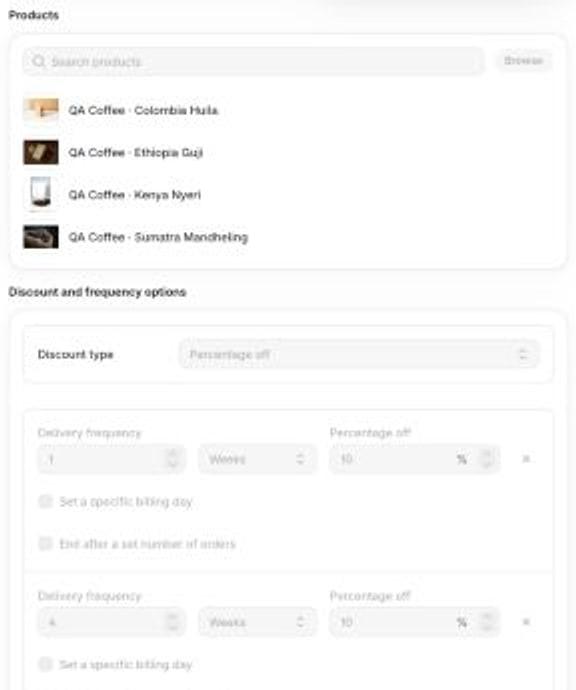
Leave the set product off the plan. It stays a one-time product with no purchase options. Shopify can't split a product bought on a plan into its items, so a set bought on subscription goes into the cart as its items, each on the plan. Luxe won't activate a set whose set product has a subscription.
Step 2: Turn on subscriptions for the bundle set
- In Luxe, open the set in Bundle sets and go to the Pricing tab, Subscriptions.
- Under Sell this set, choose:
- One-time only: as today, and the default.
- One-time and subscription: shoppers choose a one-time purchase or a plan.
- Subscription only: the builder and the tray offer only your plans.
- Under Plans to offer, tick the plan. Luxe reads the plans from your items in Shopify: each shows its saving, its frequencies and how many of the set's items it covers, such as On 4 of 4 items.
- Choose what is Shown first. Shopify recommends one-time purchase first.
- For a set priced with Set price, optionally enter a Subscriber set price: a lower set price for subscribers' first delivery. Luxe suggests one from the plan's percentage. Left empty, subscribers pay the set price.
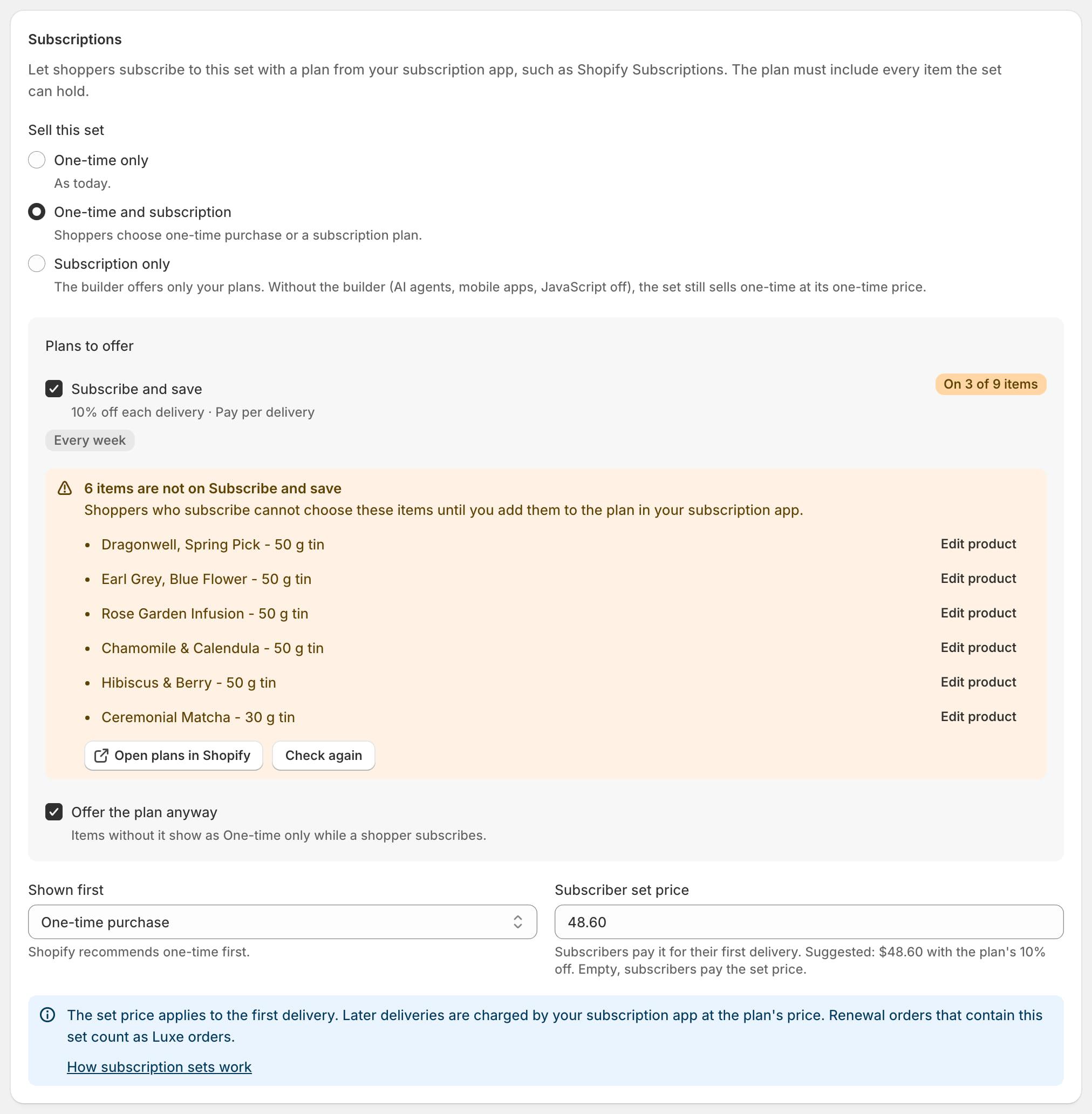
"None of this set's items is on a subscription plan yet"
This notice means the plan is not on the set's items yet. Add the plan to the items in your subscription app, either on each product (the product's page in Shopify, Purchase options) or in the plan's Products list, then select Check again. The items need the plan, not the set product.
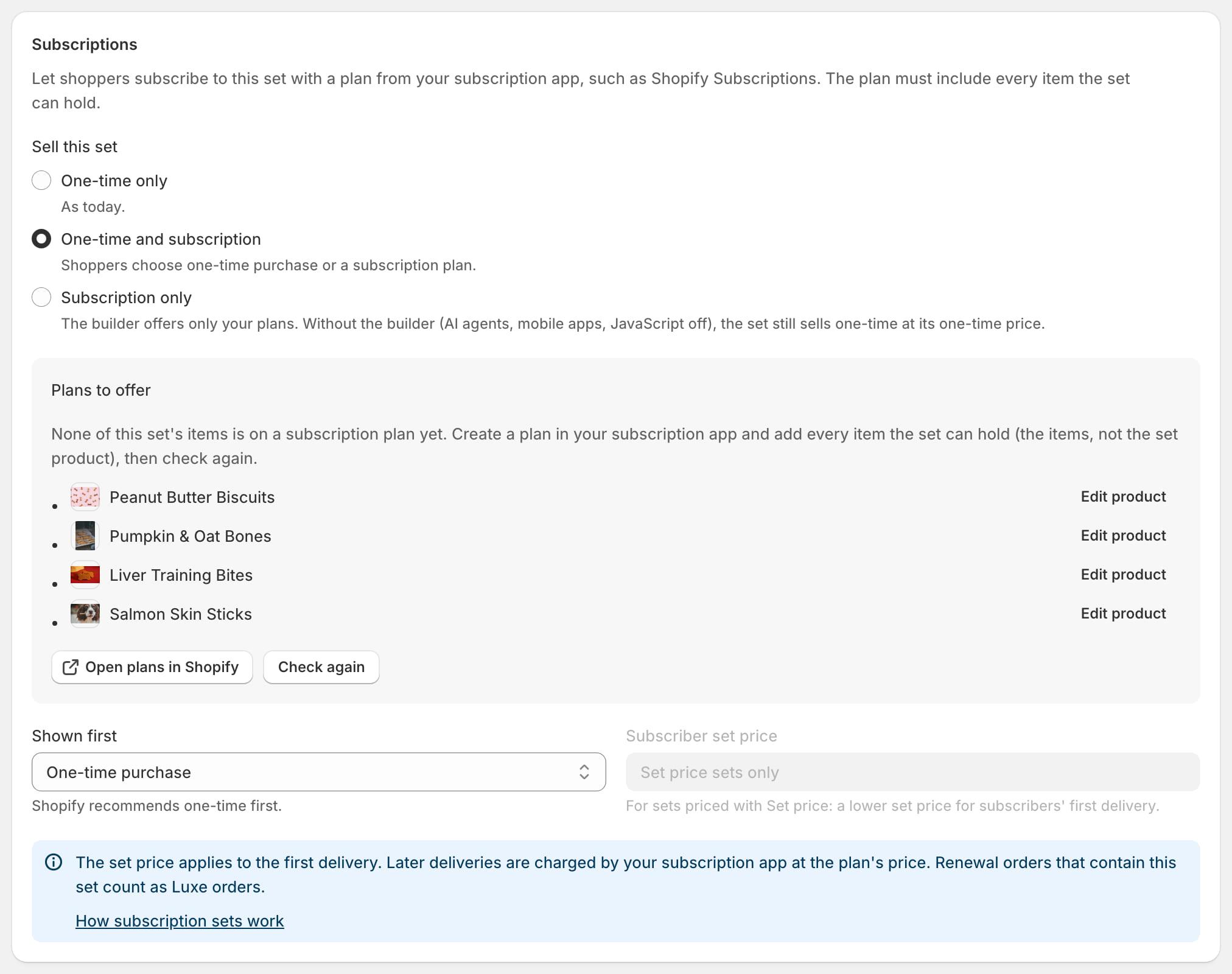
Open plans in Shopify opens your Apps page, where your subscription app and its plans are, in a new tab, so changes you have not saved in the editor are kept.
When an item is not on the plan
The editor names each item the plan misses, with Edit product beside it: Shopify's own product editor opens over Luxe, where Purchase options is, so you never leave the bundle set. Add the product to the plan and close the editor; Luxe checks the plans again on its own, or select Check again.
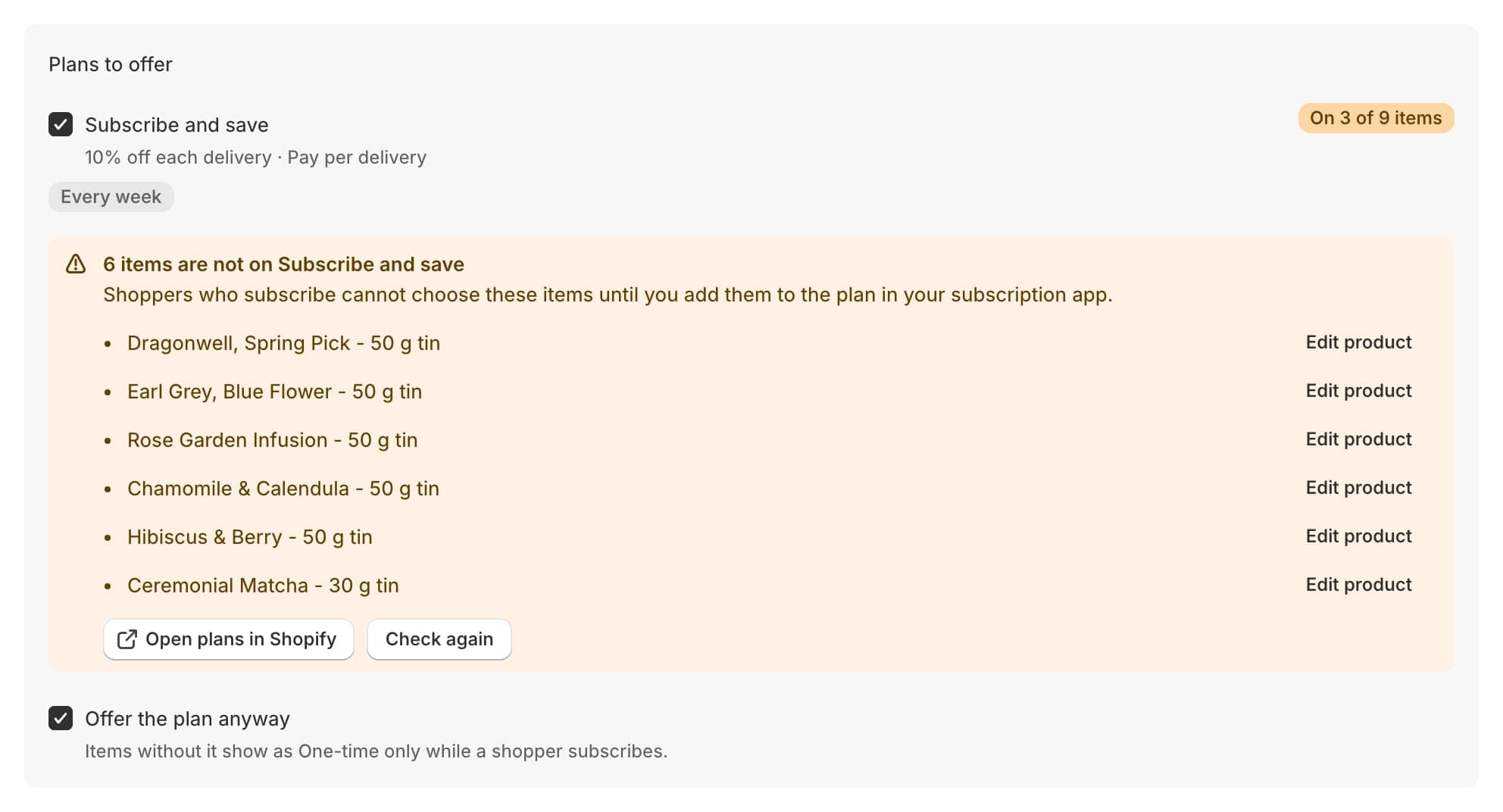
Until every item is on the plan, shoppers are not offered it. On a Build-your-own or Collection set you can choose Offer the plan anyway: items without the plan then show as One-time only while a shopper subscribes. A Fixed set's products are always in the box, so every product must be on the plan.
If a plan loses an item later, the set stays live and keeps selling one-time, the plan is no longer offered, and Bundle sets flags the set until you add the item back.
Step 3: Check the price, then go live
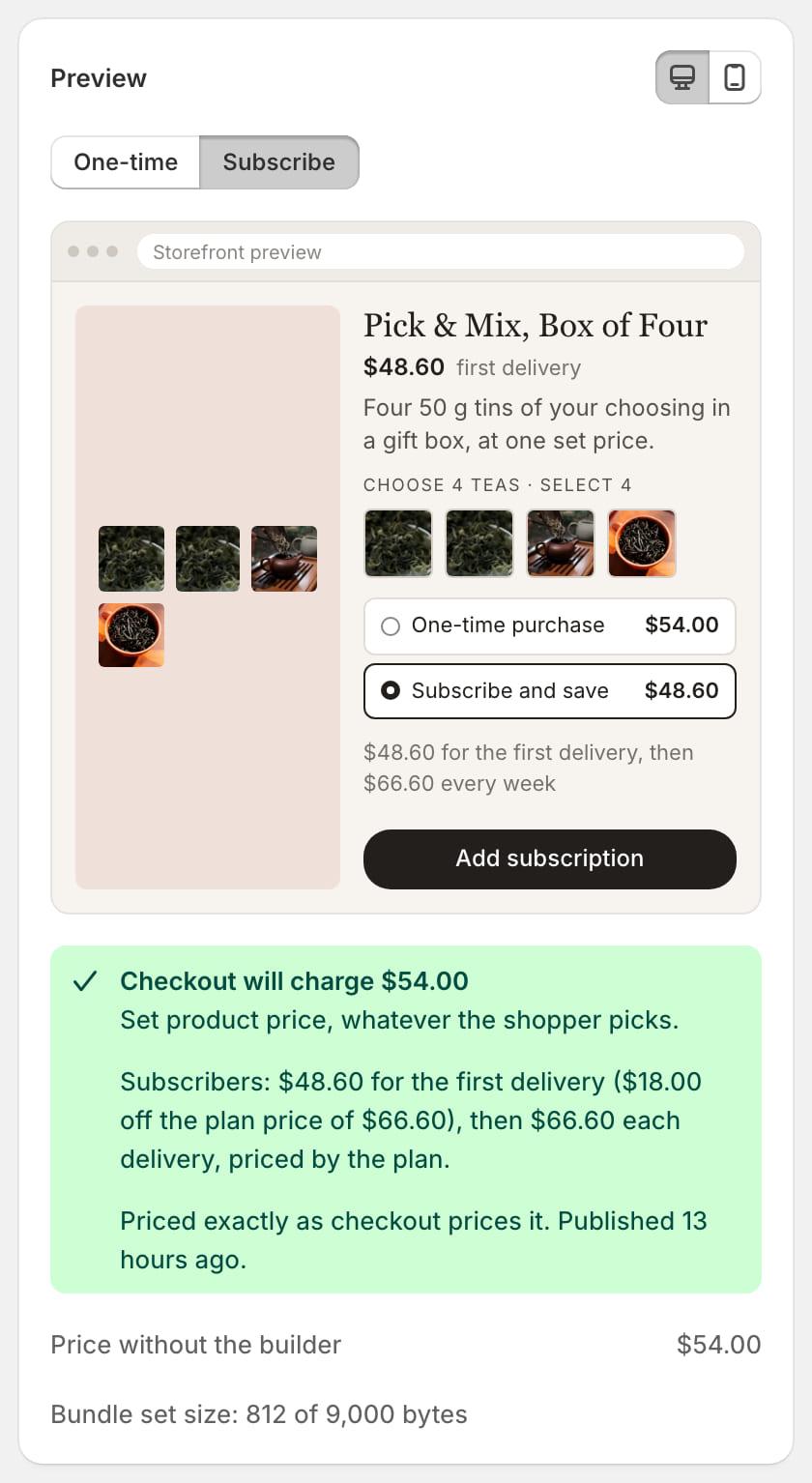
- In the Preview beside the editor, One-time and Subscribe show the builder with each purchase option.
- Read Checkout will charge. It gives the one-time price of the default picks and, for subscribers, the first delivery and each later one: "Subscribers: $45.36 for the first delivery (10% off the plan price of $50.40), then $50.40 each delivery, priced by the plan."
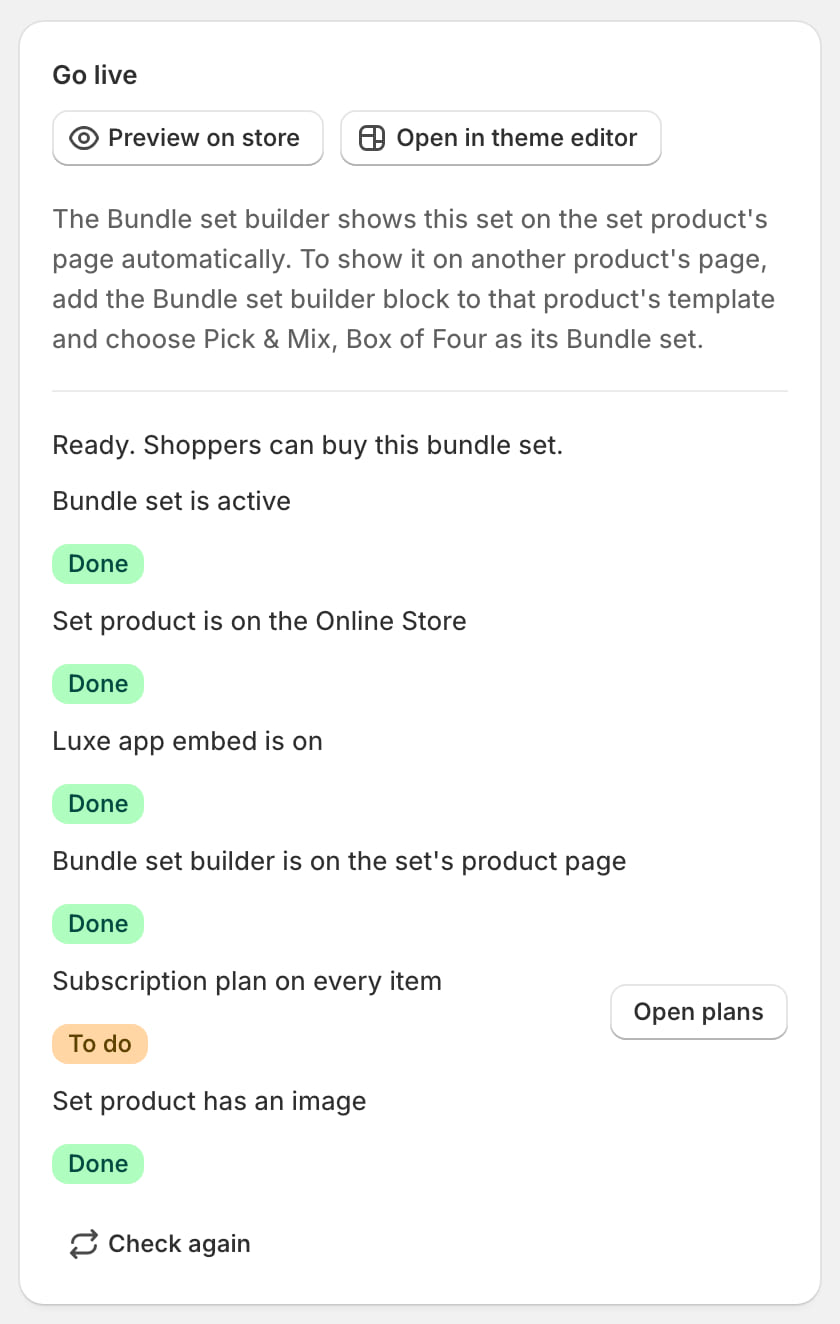
- Save. Go live shows Subscription plan on every item: Done once every item is on the plan, To do while one is missing.
- Set the status to Active, if the set is not live yet.
The Luxe Rewards discount. Luxe's checkout discount, which gives subscribers the set's price, applies to subscriptions by default. If yours does not, the Subscriptions section says so, and saving the set switches it on. Your rewards ladders then also apply to subscription items on first orders.
What shoppers see
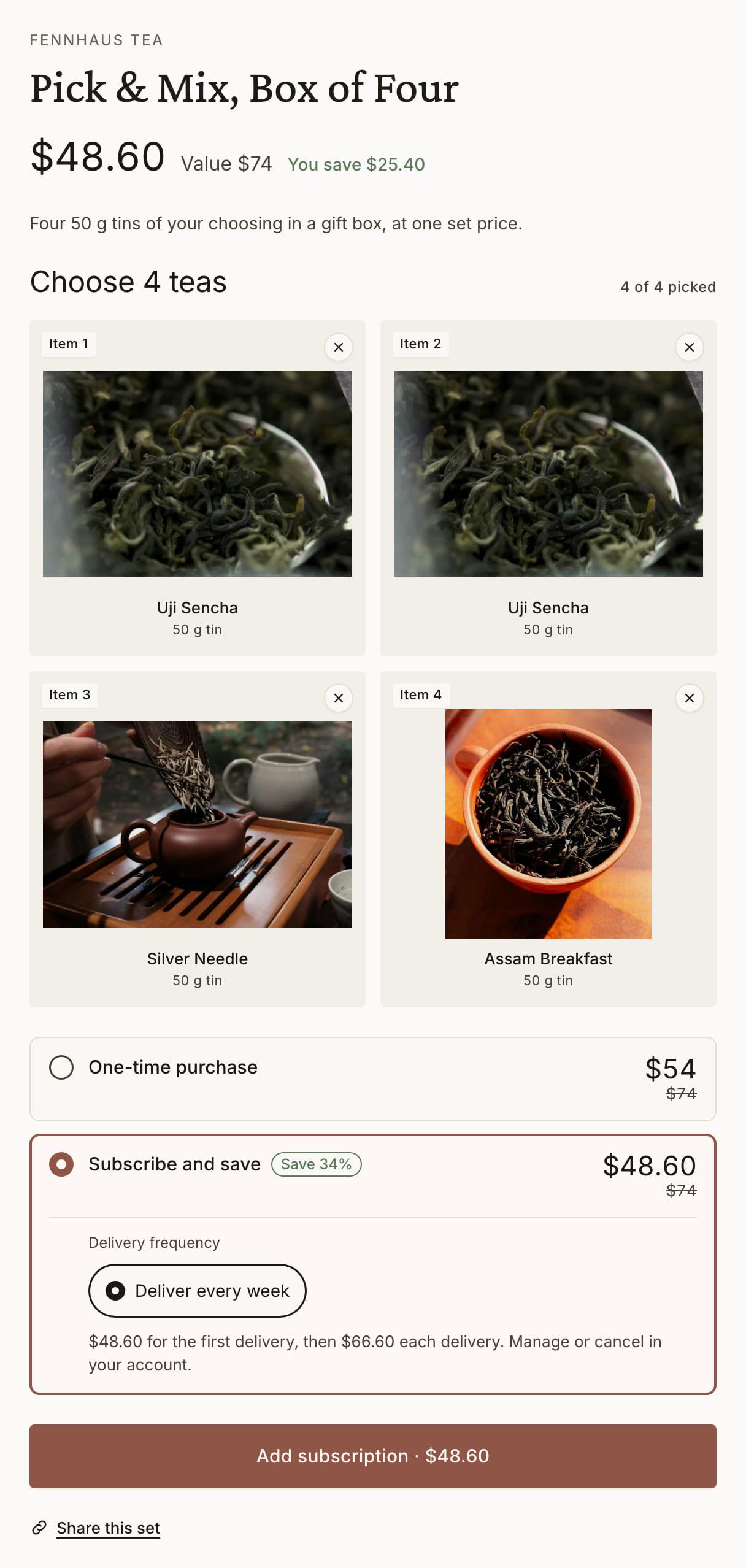
- Bundle set builder. Above the add button, the purchase option: One-time purchase, then each plan by its name, with its saving ("Save 19%") and the first delivery's price. Under a chosen plan: its frequencies, "$43.74 for the first delivery, then $48.60 each delivery. Manage or cancel in your account.", and a link to your subscription policy when your store has one. The button reads Add subscription · $43.74. Items the plan does not cover show One-time only.
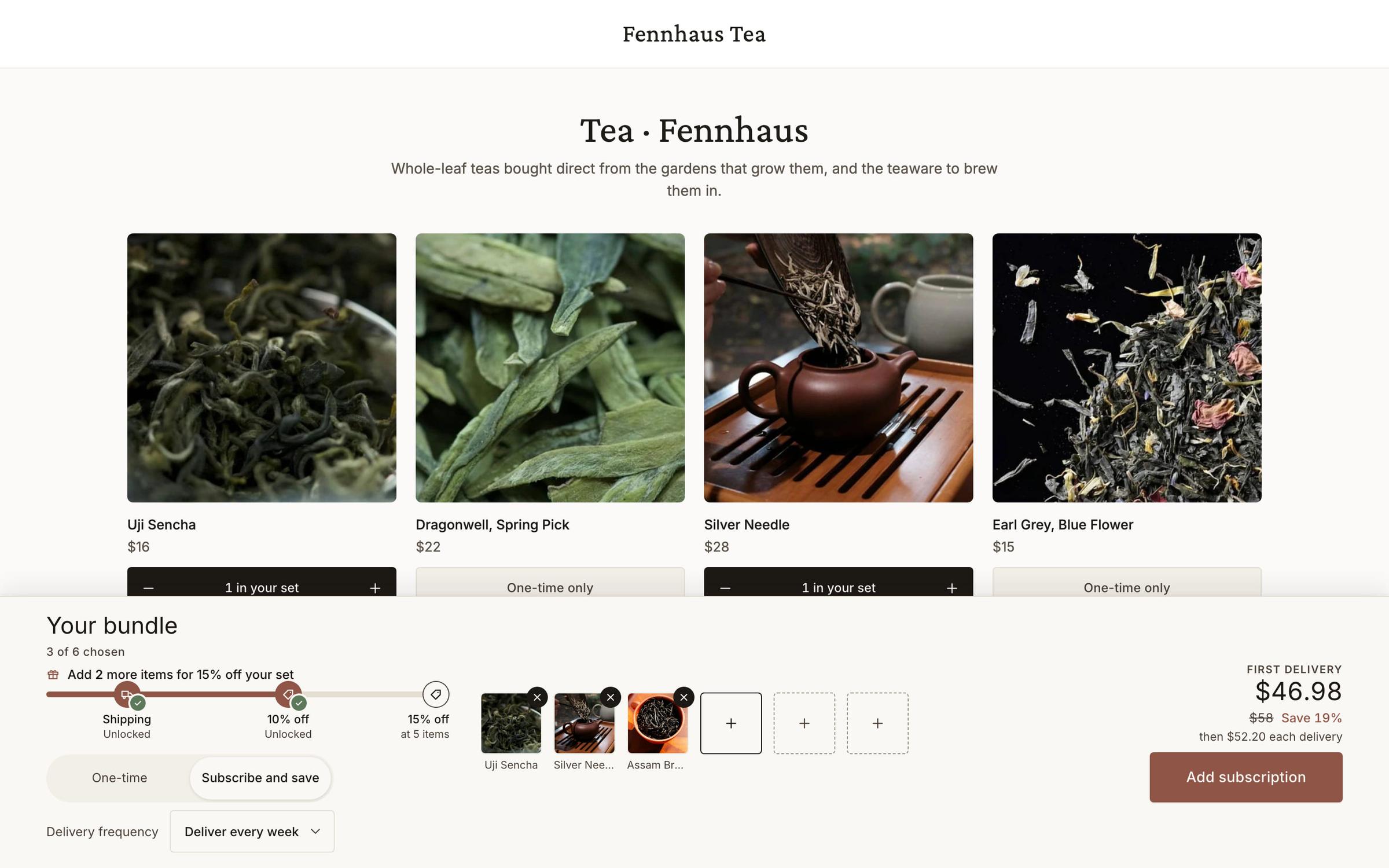
- Collection set tray. The same choice in a compact switch, the first delivery's total, and the price of each later delivery.
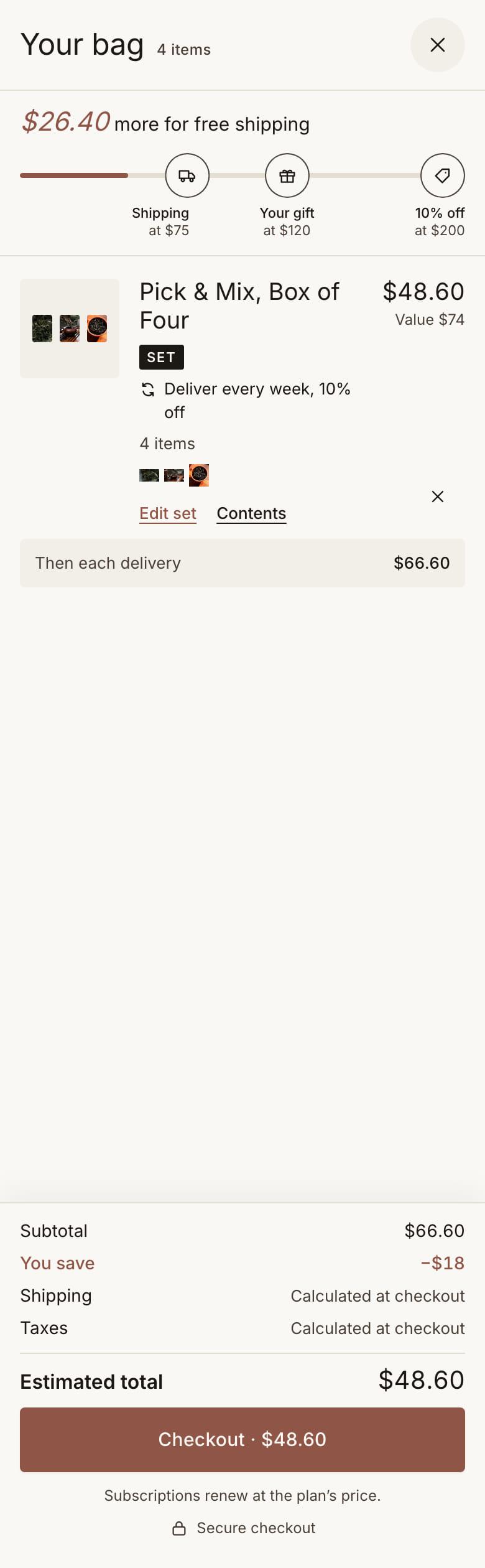
- Luxe cart. The set stays one group, with the plan once ("Deliver every 4 weeks, 10% off"), Then each delivery $48.60, and "Subscriptions renew at the plan's price." under the checkout button. Edit set keeps the plan, and is how shoppers change a set's plan.
- Checkout. Each item is its own line with the plan ("Deliver every 4 weeks, 10% off") and the set's saving, named after the set. Shopify adds its own note that the order has a recurring charge.
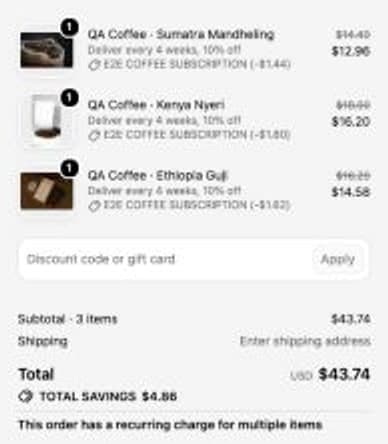
With your theme's own cart, each item is its own line with the plan's name, as Shopify shows any subscription. Every word Luxe shows is yours to change in Settings > Storefront > Storefront words: the builder's under Bundle set builder, the cart's under Cart and the tray's under Collection sets. The plan's name and frequencies always come from your subscription app.
Single products on a plan in the Luxe cart
Shoppers can also subscribe to a single product on its own product page, outside any set. With Purchase option in the cart on (Cart > Subscriptions in the cart), the Luxe cart lets them switch such a line between one-time and your plans and, if you choose, subscribe to a one-time line from the cart. A bundle set never shows that switch, so a set's items always share one plan. See Subscriptions in the cart.
Which bundle sets can be sold on subscription
Whether a set can subscribe depends on its pricing, not on your plans.
| Type | On subscription with | Stays one-time with |
|---|---|---|
| Build-your-own set | One slot group, priced with Percent off items, Save more with more, or Set price with a fixed number of picks | Two or more slot groups, fixed components, Per-slot rules, Cheapest item free (buy X, get Y), Amount off the set, premium picks, or a set price for a varying number of picks |
| Collection set | Any pricing | |
| Fixed set | Set price or Percent off items, every product at its own price | Amount off the set, or a product that is free or at a fixed amount |
Why some pricing stays one-time. A subscribed set reaches checkout as separate items, each already at the plan's price, and Luxe's checkout discount can lower a price but never raise one. Some pricing needs to do more than lower each item's price:
- Premium picks add an amount for some items: a pistachio pastry at +$1.50 in a box at a set price. A discount can't add $1.50.
- A fixed-price product in a Fixed set, such as a dripper at $5, can cost more than its line on the plan.
- Per-slot rules, Cheapest item free (buy 2, get 1 free) and two or more groups price by slot or by which item is cheapest. Separate items on a plan have no slots to read.
- Amount off the set, such as $20 off whatever is picked, is not available on subscription yet.
- A set price for a varying number of picks, such as 3 to 6 coffees at one price, needs the same minimum and maximum picks to subscribe.
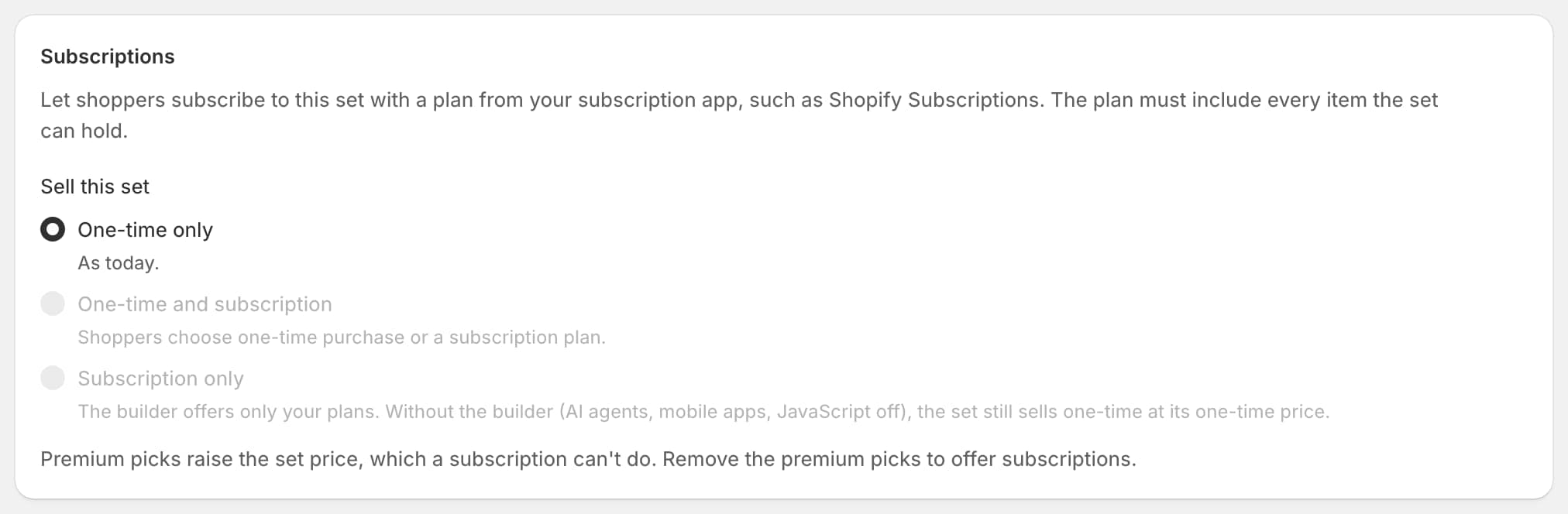
The editor shows the subscription choices on every bundle set. On a set that cannot use them, they are disabled and the reason is under the choices.
Renewals, rewards and billing
- First orders. A subscribed set's first order is a Luxe order, like any order with a bundle set: one Luxe order, whatever it holds.
- Renewals. A renewal order that contains the set counts as a Luxe order when it carries Luxe's marker on its lines, which happens when your subscription app copies the first order's line properties onto each renewal. Luxe never writes to subscriptions or renewal orders. A renewal that carries the marker is billed like any other Luxe order: included orders first, the same rates, and a full refund credited. Billing marks it Renewal. See what counts as a Luxe order.
- No extra fee. Subscriptions are on every plan. Luxe Starter's one bundle set can sell on subscription too.
- Rewards ladders apply to the first order only, like the set's price. If Settings > Checkout and pricing > Rewards: what never counts has Subscription lines never count on, a subscribed set earns no ladder rewards (no rung discount, free shipping or gift), while its set price still applies. A Rewards only Collection set's subscribers then get no tier discount, since its tiers come from a ladder. The set's Subscriptions section says so.
- Analytics splits bundle set orders and revenue into one-time, subscription first orders and renewals, in Bundle sets by purchase option.
A worked example
A shopper on a Luxe test store builds the coffee set from three coffees, priced Percent off items 10%, and subscribes on "Subscribe and save 10%", delivery every 4 weeks:
| Sumatra Mandheling | Kenya Nyeri | Ethiopia Guji | The set | |
|---|---|---|---|---|
| Store price | 16.00 | 20.00 | 18.00 | $54.00 |
| The plan's price: 10% off | 14.40 | 18.00 | 16.20 | $48.60 |
| First delivery: the plan's price, less the set's 10% | 12.96 | 16.20 | 14.58 | $43.74 |
| Each later delivery: the plan's price | 14.40 | 18.00 | 16.20 | $48.60 |
The builder showed "Save 19%" ($43.74 against $54.00) and Add subscription · $43.74. The Luxe cart showed Then each delivery $48.60 and "Subscriptions renew at the plan's price.", and checkout charged $43.74, each coffee with "Deliver every 4 weeks, 10% off" and the set's discount. A shopper who buys the same set one-time pays $48.60, once.
What stays one-time
- The set product. A set bought on subscription goes into the cart as its items, each on the plan. The set product itself stays a one-time product.
- Without the Bundle set builder. With JavaScript blocked or the app embed off, through AI shopping agents, and in mobile apps built with the Luxe Tapcart blocks, a set sells one-time at its one-time price, even when it is Subscription only. The Tapcart Set Builder shows a Subscription only set as "Available on our online store".
- Some pricing. The set types and pricing under "Stays one-time with" above.
- Subscription-only products can't be set items: a set's items must also sell one-time.
- Prepaid, pre-order and try before you buy plans are not offered with sets.
Compatibility
| Subscription app | Status |
|---|---|
| Shopify Subscriptions (free) | Verified: first orders price, check out and count as Luxe orders. Renewals are being verified |
| Recharge, Skio, Loop, Appstle and others | Not verified yet. Luxe adds ordinary cart lines with your plan, so an app whose plans Shopify shows on your products may work; Luxe names an app here only after a live order with it |
Frequently asked questions
Why is Subscribe greyed out on my bundle set?
Because of the set's pricing, not your plans. Premium picks, a fixed-price product, per-slot rules, cheapest item free, amount off the set and two or more groups can need to raise an item's price, and a checkout discount can only lower one, so those sets stay one-time. The reason is shown under the choices in the Subscriptions section.
Does the set product need a subscription plan?
No. The plan goes on the products inside the set, never on the set product. The set product has no purchase options, and Luxe won't activate a set whose set product has a subscription.
What do later deliveries cost?
The plan's price, charged by your subscription app. The set's own saving applies to the first delivery only, so a coffee set that costs $43.74 on its first delivery costs $48.60 on each delivery after it.
Do rewards ladder rewards apply to renewals?
No. Rewards ladders, like the set's price, apply to the first order only. With Subscription lines never count on, a subscribed set earns no ladder rewards on its first order either.
Which subscription apps work with Luxe?
Shopify Subscriptions is verified on live orders. Recharge, Skio, Loop, Appstle and other apps work in principle, because Luxe adds ordinary cart lines with your plan, but they are not verified yet.
Are subscription renewals billed as Luxe orders?
Yes, when the renewal carries Luxe's marker on its lines, which happens when your subscription app copies the first order's line properties onto each renewal. Such a renewal is billed like any other Luxe order, with your included orders used first. Renewals with Shopify Subscriptions are being verified.
Good to know
- Luxe never creates, edits or cancels plans or subscriptions: they stay in your subscription app.
- If you uninstall Luxe, existing subscriptions keep renewing in your subscription app at the plan's price, and your items stay on their plans.
- Shoppers in other markets see the first delivery's price in their currency, as checkout charges it.